PowerDirector is a top-tier video editing application celebrated for its innovative tools and intuitive interface. It doubles as a full-featured video editor and creator, distinguished by its groundbreaking AI Body Effect for applying dynamic visuals to moving subjects. From a green screen editor to a video stabilizer and monthly tool updates, PowerDirector provides a complete toolkit to turn everyday clips into remarkable content. Additional assets like Anime Photo Templates and an extensive stock library meet a wide spectrum of creative demands.
Revolutionary AI Body Effect
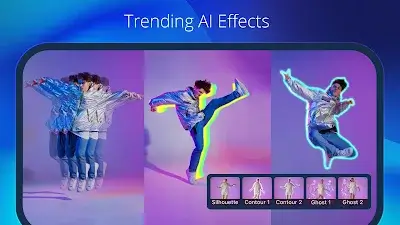
PowerDirector's standout feature, the AI Body Effect, marks a major advancement in mobile video editing. This innovative technology lets users easily apply impressive visual effects that naturally follow the shape of a moving person. It removes the need for complex manual edits, saving significant time while enabling creators to achieve a polished, studio-grade look. With the AI Body Effect, PowerDirector helps users produce professional-quality videos effortlessly, highlighting the app's dedication to expanding the possibilities of mobile editing.
Diverse Anime Photo Templates
The addition of Anime Photo Templates brings a fun, creative dimension to PowerDirector. Users can quickly turn themselves into animated characters by selecting a template, importing their clips, and letting the app apply anime-style effects, transitions, and music to craft a visually captivating piece.
Professional Video Editor
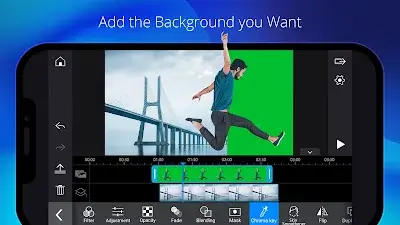
PowerDirector’s Pro Video Editor gives users the power to transform regular footage into something special. This video maker includes a green screen editor and a video stabilizer, offering access to a rich collection of advanced editing tools that are refreshed every month. Whether you're producing slow-motion sequences or assembling video collages, PowerDirector delivers a full range of features to realize your creative vision.
Precise Video Editing & Enhancement
PowerDirector makes editing straightforward with user-friendly controls. Trim, cut, split, and rotate clips with simple taps. Fine-tune brightness, color, and saturation with precision. Add striking effects and transitions using drag-and-drop ease. The multi-track timeline lets you combine photos and videos, while text and animated titles can be inserted in seconds. The app further shows its flexibility by enabling the creation of video and photo collages with custom overlays.
Other Advanced Features
With its extensive toolset and content library, PowerDirector ensures editors of all skill levels can become proficient. Key features include:
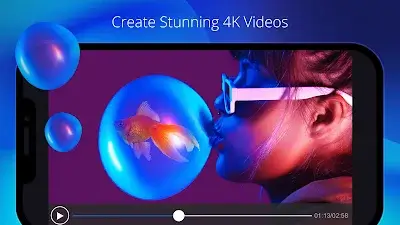
- Edit and export videos in up to 4K resolution.
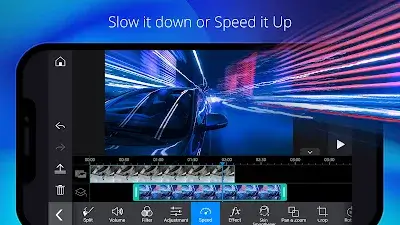
- Adjust video pacing with speed controls.
- Smooth out shaky footage with the video stabilizer.
- Improve brightness and saturation using adjustment layers.
- Design engaging introductions with animated titles.
- Try out different voices with audio effects in the voice changer.
- Remove backgrounds easily with smart cutout or use chroma key for green screen replacement.
- Apply Keyframe controls for exact adjustments to transparency, rotation, position, and scale in picture-in-picture and mask effects.
- Create double exposure visuals using video overlays and blending modes.
- Upload finished videos directly to YouTube and Facebook to share your work with a global audience.
Conclusion
PowerDirector is more than a simple video editor—it's an all-in-one video production suite designed for the varied needs of modern creators. Through continual innovation and a focus on delivering powerful yet approachable tools, the app has established itself as a leading choice for anyone aiming to enhance their video editing and content creation projects. Whether you're just starting out or are an experienced pro, PowerDirector stands ready as your creative partner in the dynamic world of video production.