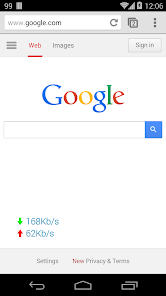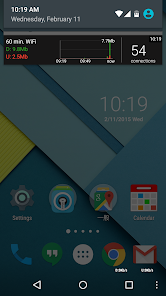
Network Monitor Mini Pro is an essential tool for anyone looking to optimize their smartphone's network performance. This app offers real-time visibility into your network speeds, whether you're connected via WiFi, 4G, or 5G. With its customizable interface, you can tailor the position, color, and transparency of the network speed indicator to fit your screen perfectly. This level of personalization ensures that you can easily monitor both your upload and download speeds without disrupting your usual device usage.
Features of Network Monitor Mini Pro:
> Real-time Network Speed Monitoring: With Network Monitor Mini Pro, you can keep an eye on your network's performance in real time. This feature helps you understand and manage your device's network efficiency effectively.
> Customizable Network Speed Meter Icon: The app allows you to customize the appearance of the network speed meter icon. This personalization not only enhances your user experience but also makes it more convenient to keep track of your network speeds.
> Personalization Options: You have full control over the look of the network speed indicator. Adjust the color, set the transparency level, and even choose the number of decimal places shown for a truly tailored experience.
> Optimized Network Utilization: Network Monitor Mini Pro smartly hides readings when there's no network activity, helping you optimize your network use. Additionally, the indicator can be set to disappear when using other apps, maximizing your screen space.
> Normalization of VPN/Proxy/Loopback Traffic: A standout feature of this app is its ability to normalize VPN, proxy, and loopback traffic. This ensures that your network performance data remains accurate and comprehensive, allowing for better analysis.
Tips for Users:
> Customize the Network Speed Meter: Make the most out of the app's customization features. Adjust the network speed meter to your liking for easy visibility and a personalized touch.
> Optimize Network Utilization: Use the option to hide readings when there's no traffic. This helps in making efficient use of your network resources and improves overall performance.
> Experiment with Settings: Don't hesitate to play around with the various settings available. Find the perfect combination of decimal place and transparency that suits your needs for an optimized experience.
Conclusion:
Network Monitor Mini Pro stands out as a robust application designed to provide real-time monitoring of your network speed alongside extensive customization options. By personalizing the network speed meter and optimizing network utilization, you can manage your connections more efficiently. The app's normalization feature adds an extra layer of accuracy for monitoring VPN, proxy, and loopback traffic, ensuring a thorough analysis of your network performance. By tweaking the app's settings to your preference, you can enhance your browsing, streaming, and downloading activities. Download Network Monitor Mini Pro today to take full control of your network speed and elevate your smartphone experience.
What's New
Network change fix: require Phone permission
Notification: IPv6 first option
Add font option
Bug fix
Mod Info:
No root or Lucky Patcher or Google Play Modded required;
Disabled / Removed unwanted Permissions + Receivers + Providers + Services;
Optimized and zipaligned graphics and cleaned resources for fast load;
Ads Permissions / Services / Providers removed from Android.manifest;
Ads links removed and invokes methods nullified;
Ads layouts visibility disabled;
Google Play Store install package check disabled;
Debug code removed;
Remove default .source tags name of the corresponding java files;
Analytics / Crashlytics / Firebase disabled;
Languages: Full Multi Languages;
CPUs: universal architecture;
Screen DPIs: 120dpi, 160dpi, 240dpi, 320dpi, 480dpi, 640dpi;
Original package signature changed;
Release by Balatan.