In *Monster Hunter Wilds*, you have the flexibility to engage with voice chat or opt for a quieter experience, even in this multiplayer setting. If you're keen on using the in-game voice chat instead of external platforms like Discord, understanding how to configure these settings is key.
How to Use and Mute Voice Chat in Monster Hunter Wilds
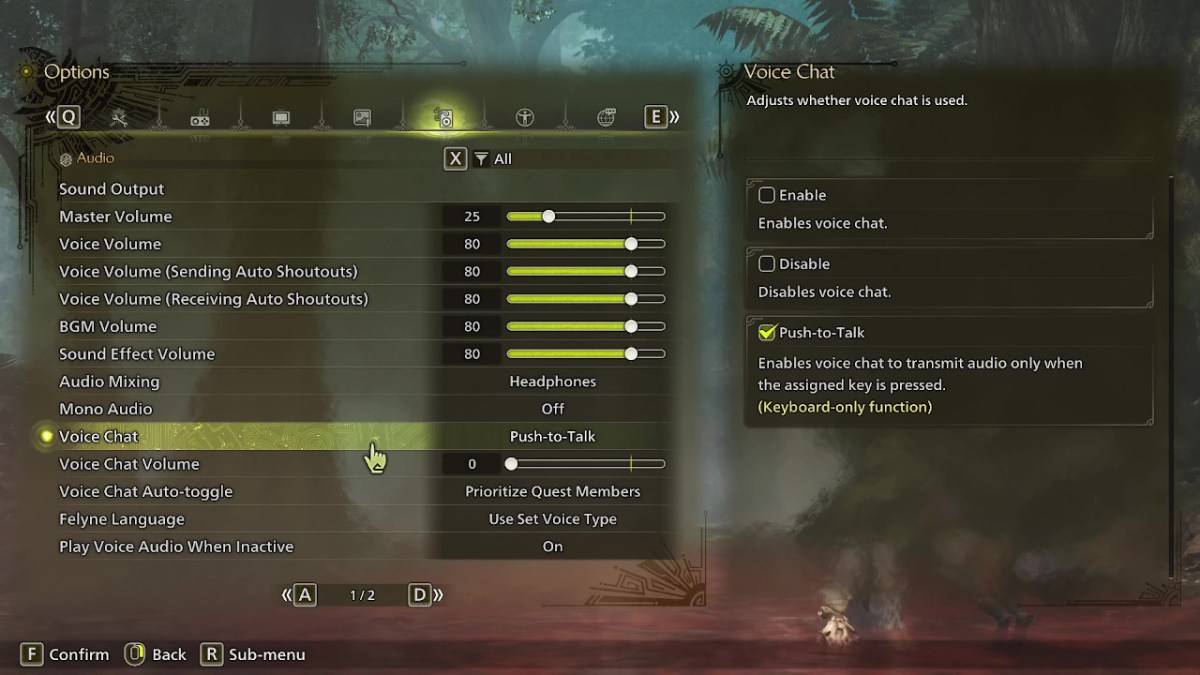
All voice chat settings in *Monster Hunter Wilds* are found within the audio section of the menu. To access these, navigate to the options menu either during gameplay or from the main menu screen. Select the third tab from the right, and scroll down until you find the Voice Chat setting. Here, you'll encounter three options: Enable, Disable, and Push-to-Talk. Choosing 'Enable' keeps the voice chat active at all times, 'Disable' turns it off completely, and 'Push-to-Talk' allows you to activate voice chat by pressing a designated key on your keyboard, though this feature is only available for keyboard users.
Additionally, you can adjust the Voice Chat Volume to set how loud the chat is for you. The Voice Chat Auto-Toggle feature lets you decide how the game prioritizes voice communication. You can set it to automatically focus on Quest Members, who are the players you're currently in a quest with, making it the most common choice for seamless teamwork. Alternatively, you can prioritize Link Members, which is useful when you're guiding someone through the story and need to communicate while waiting for them to progress through cutscenes. You also have the option to turn off the auto-toggle feature altogether.
That covers everything you need to know about managing voice chat in *Monster Hunter Wilds*. While the in-game audio quality might not match that of dedicated communication apps, having the option to use voice chat directly in the game is particularly handy for cross-platform play. If you're looking for the best audio experience, consider using external apps, but the in-game voice chat remains a valuable tool for quick and easy communication.