Azure Latch is a dynamic, anime-inspired soccer experience on Roblox, heavily influenced by the Blue Lock series. Developed by Twi game, it combines traditional football gameplay with high-energy special abilities, delivering an adventure centered on individual skill, creative tactics, and strategic thinking. While Roblox offers fewer standout football titles, Azure Latch consistently ranks among the best in player opinions. Score spectacular goals and unleash powerful finishers for thrilling combo moves. Of course, all great things come at a cost—including in-game items. If you want to earn bonus in-game cash without spending, you're in the perfect spot!
All Active Azure Latch Redeem Codes
While Azure Latch redeem codes are infrequent, they reward players generously with Cash when available. For free-to-play users, these codes offer one of the simplest ways to boost your funds without extra effort. Be sure to bookmark this page—we’ll update it with new codes as soon as they launch. Here’s the current list of active Azure Latch redeem codes:
Jakethesnake : Enter this code to receive 10,000 CashTheKing : Enter this code to receive 10,000 CashAMMISTHEOWNERNOTLEFTRIGHTTH : Enter this code to receive 10,000 CashDelayLatch : Enter this code to receive 10,000 Cash
Each code can only be redeemed once per account. Remember to type the code exactly as shown, including capitalization. Some codes may carry specific terms, which we’ll note alongside the code if applicable.
How to Redeem Codes in Azure Latch?
To redeem your codes in Azure Latch, just follow these steps:
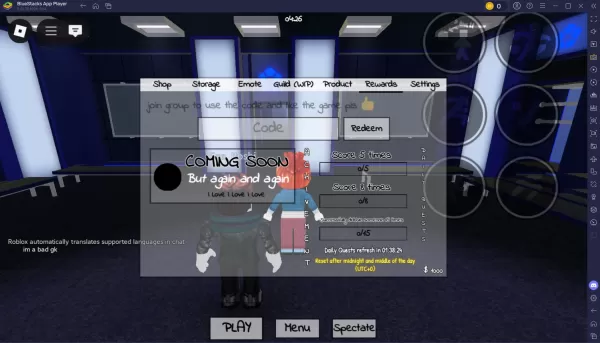
Launch BlueStacks and open the Roblox application.Access Azure Latch and log into your account.Go to the Menu icon at the bottom-right corner of your screen.Select the Rewards section, where you'll see a text input box.Type or paste a code from the list above and click “Redeem.”Your rewards will be credited immediately.
Codes not Working? Check about the Reasons
If a code doesn't work, one of these factors may be the cause:
Expiry Date: Even though we verify every code's expiration date, some are not given one by developers. Occasionally, codes without an official expiry may still fail.Case Sensitivity: Be sure to enter the code using the same uppercase and lowercase letters. We recommend copying and pasting codes directly for accuracy.Redemption Limit: Unless stated otherwise, a code can only be used once per account.Usage Limit: Some codes are capped at a total number of uses—unless noted.Regional Restrictions: Certain codes may be valid only in specific regions. For instance, codes meant for the United States typically won't work in Asia.
With BlueStacks, players can enjoy Azure Latch and similar Roblox titles on a larger PC or laptop screen, with the added control of a keyboard and mouse.