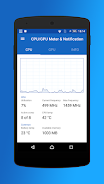
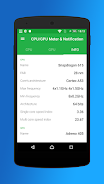
Get immediate CPU and GPU insights with the CPU/GPU Meter & Notification App! Stop juggling between apps to monitor your device's performance — our app delivers constant notifications showing CPU and GPU usage, frequency, temperature, and more. Identify which app is using the most CPU power, track individual CPU cores, and monitor available memory and GPU activity. Access all essential hardware data with just a swipe. Moreover, our Europe-based team continuously refines the app, having already introduced a dark theme. Download now to optimize your device’s performance!
Key Features of the CPU/GPU Meter & Notification App:
- Shows the app or process currently consuming the most CPU cycles.
- Displays total and per-core CPU utilization to let you monitor your device's performance.
- Provides CPU frequency details, including current, maximum, and average frequencies.
- Indicates which CPU core is active, so you know where processing is focused.
- Monitors CPU and battery temperature, helping you keep tabs on device heat.
- Displays available memory and GPU utilization for a full picture of your device's hardware performance.
Conclusion:
The CPU/GPU Meter & Notification App saves you from switching between apps to track CPU and GPU stats. It delivers real-time data through a persistent notification for ultimate convenience. With a simple swipe, you can view CPU utilization, frequency, active cores, temperature, available memory, and GPU data in one place. Developed by a Europe-based team with a keen eye for hardware specifics, the app ensures accurate and reliable monitoring. It supports Android 14 and includes a dark theme for a better visual experience. While latest Android versions may limit full GPU support due to permissions, the app remains an effective tool for monitoring and enhancing device performance. Feel free to share suggestions for new features in the comments — the developers welcome your feedback. Try the CPU/GPU Meter & Notification App today to unlock deeper insights into your device's hardware!