Are you looking for a desktop computer-style launcher on your Android? Do you love the new style of Win10 launcher? Check out this computer-style launcher available for your Android smartphones. Surprise your friends with the new look and style of your Android. Computer Launcher 2 is an excellent app for you to experience the computer in a stylish UI. With built-in support for file explorer and file manager, you can easily search, explore, and manage your files and folders. Customize your phone with the unique look and feel of the fastest launcher. Download Computer Launcher 2 now and experience the desktop computer design on your Android device.
Features of this app:
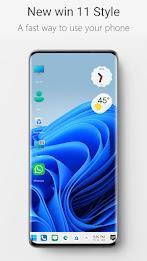
- Desktop computer style launcher: The app provides a desktop computer style launcher for Android devices, giving them a unique and visually appealing look.
- Customize your phone: With the app, users can customize the look and feel of their Android devices, allowing them to personalize their phones according to their preferences.
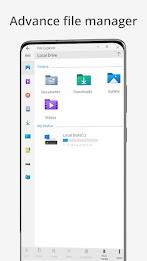
- File manager: The app comes with a built-in file explorer and file manager, allowing users to easily search, explore, and manage their files and folders. They can perform actions like copy, paste, zip/unzip, remove files, and share files.
- Network sharing: Users can share their files and folders with others using the app over a Wi-Fi network. This feature enables seamless file sharing between devices.
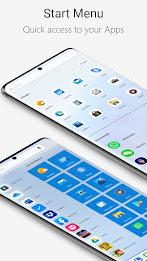
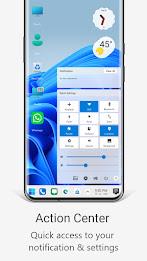
- Taskbar and start menu: The app includes a taskbar and start menu, similar to those found on a Windows 10 computer. This allows users to easily access their most used applications, create shortcuts, and manage their files.
- Widgets and live wallpapers: The app provides various widgets and live wallpapers, including clock, weather, and RAM info widgets. Users can customize their home screens and add different functionalities to enhance their experience.
In conclusion, this app offers a desktop computer-style launcher for Android devices, allowing users to customize their phones and experience a unique interface. With features like a file manager, network sharing, taskbar, and start menu, as well as widgets and live wallpapers, the app aims to provide a comprehensive and visually appealing user experience.